
Hey everyone. For those of you who missed it, I recently hosted a live LinkedIn AMA – Ask Me Anything – for 15 minutes to test the new LinkedIn Audio Events feature and answer some questions.
Let me just say that I’ve done this for a long time. This is what I do for a living – getting into the dirt with new social media platforms and features. It’s what I did with Twitter, YouTube, Facebook, Instagram, Snapchat, TikTok and more. That being said, with only a few seconds into my first LinkedIn Audio Event, I could confidently say it’s a good product already… and it’s still very early.
Many of you know that I’ve been a big advocate of audio for a long time now. Check out this blog I wrote five years ago on The Rise of Audio & Voice. Then when Clubhouse first came out in 2020, I said to everybody, this is going to be like Snapchat Stories… It’s a feature that every platform should do because audio is clearly something people want. It’s a time saver that allows you to consume content while still living your life. So the Audio Events feature is a smart move from LinkedIn. By the way, you should learn more about my show on Twitter Spaces, DNA with GaryVee featuring emerging artists.
To put it into perspective, just in my 15-minute LinkedIn AMA alone, there were 500 people who joined in the middle of the day without me even promoting it much. The power of voice and audio aside, there are still questions that you have as a first-time user of anything. For audio features like this one, you might ask: How do I call people up onto the stage? How do I follow or share? My hot take on LinkedIn’s new Audio Events is that I like it; it’s intuitive and easy to figure out. I think LinkedIn is gonna find this successful and the quality of the conversations is gonna matter.
I’ll keep using the feature and testing it out with my LinkedIn community in the coming weeks, but that’s about all I can after my first use. Now, I’ll pass it off to my team to break down the specifics.
I hope this helps.
Team GaryVee, here 👋
LinkedIn has changed a lot since it launched in 2003. It originally started as a job searching platform where people were recruited for jobs, but today, people are using the platform to put out and consume content. In fact, Gary calls it “The Business Facebook” because of its high organic reach, similar to Facebook in 2012.
Recently, LinkedIn introduced a new feature called “LinkedIn Audio Events” where people can host audio-only virtual events and interact with their audiences live. Users can:
- Host live Q&A/AMAs
- Interview experts
- Create a virtual gathering space to discuss new launches, ask for feedback about products, and have a conversation with the audience
Last Monday, March 28th, Gary tested out the feature for the very first time! Here’s some of what the team learned in the process:
How To Use LinkedIn Audio Events
Currently, LinkedIn Audio Events are in the beta testing stage and the feature is available to a group of creators to test and share their early feedback. For now, LinkedIn users don’t have the ability to host their own events, but they’re able to participate by joining the audio events hosted by their favorite creators.
Setting up a LinkedIn Audio Event
Setting up a LinkedIn Audio Event is similar to setting up any type of event on LinkedIn.
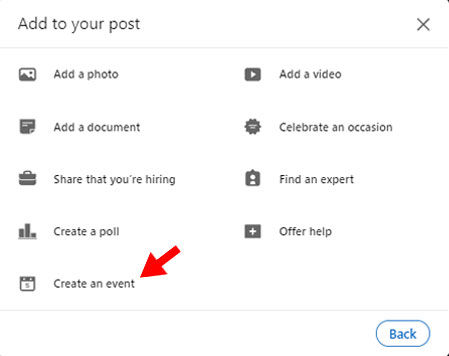
- Go to the “Create an event” page
- Click the “Event format” drop-down bar and select “LinkedIn Audio event”
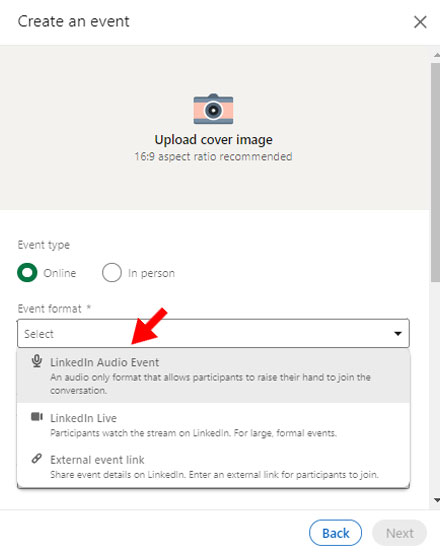
- Fill all of the required fields

4. Post!

The audio event will then be posted as a regular event on LinkedIn where people can RSVP and add to their calendars. Once scheduled, here’s an example of how an audio event will appear in the LinkedIn feed:
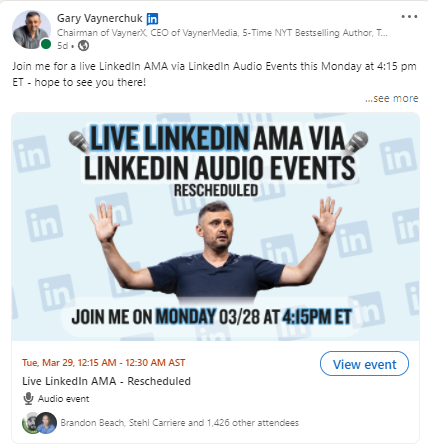
How to go live & manage the room
At the scheduled time, there will be a “Join” button in the event where you can join. First, you will be in a testing room where you will see a “Go live” button. Once you go live, people will also be able to join the event.
During the event, you will be able to get people on stage only when they “raise their hands” to interact with you or ask you a question.

You will be able to see the list of people who raised their hands by clicking on the notification under the event name. Then, you can allow them to join you on stage!

You can then move them back into the audience by tapping on their profile on the stage.
Recording the event
At this stage, LinkedIn doesn’t provide the ability to record the event. BUT, if you have a second phone or a camera, it would be a good idea to have a video of yourself talking and answering the questions, or you can just record the audio and post-produce it with some graphics, cartoons, etc. This will give you the ability to repurpose your event content and provide value to more people by sharing it across social media platforms!
Here are some examples of the content we were able to produce for Gary using recordings of his audio event:


Tips for promoting your LinkedIn Audio Event
Here are a few tips to make sure that your LinkedIn Audio Event is successful:
- Plan & schedule the event at least 2-3 days in advance to make sure that your audience knows about it.
- Provide some information in the event description section so people know what to expect from the event (like topics or special guests) and can get ready with their questions.
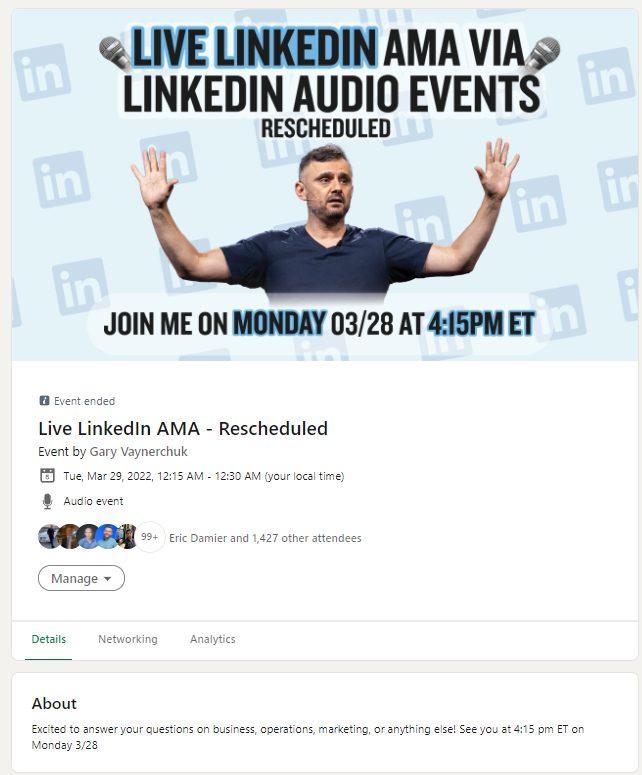
- Promote the event across your other social media pages (but realize that those without a LinkedIn account or who aren’t logged into LinkedIn won’t be able to see it)
- Re-share the event on your LinkedIn profile a few hours ahead of the event to remind people about it.
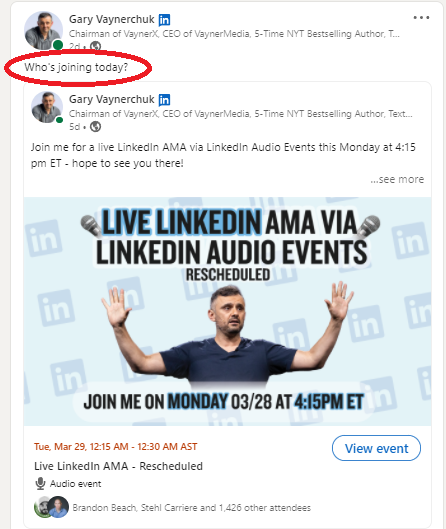
- Check the attendees section to have some context about who’s joining the event and be contextual to the room.
We really hope you enjoyed this article and that you now have at least a baseline understanding of LinkedIn Audio Events and how they work! We’d love to hear your thoughts on Twitter! Tag us @teamgaryvee or Gary at @garyvee !
Don’t forget to stay tuned for more LinkedIn Audio Events from Gary coming soon!










viagra without doctor prescription canada pharmacy online buy online pharmacy
buy medication online http://mexicanpharmeasy.com/# mexican mail order pharmacies
neurontin cap 300mg: Gabapentin Pharm – neurontin cap
Buy compounded semaglutide online Buy semaglutide pills rybelsus
https://ivermectinpharm.store/# buy stromectol
paxlovid pharmacy: Paxlovid.ink – Paxlovid.ink
Gabapentin Pharm: Gabapentin Pharm – Gabapentin Pharm
https://ivermectinpharm.store/# stromectol liquid
Gabapentin Pharm: neurontin capsules – neurontin 3
paxlovid cost without insurance: paxlovid for sale – paxlovid pharmacy
http://paxlovid.ink/# paxlovid price
ivermectin oral solution: Ivermectin Pharm – stromectol sales
https://gabapentinpharm.com/# neurontin 2018
Paxlovid.ink: Paxlovid over the counter – paxlovid pharmacy
Gabapentin Pharm neurontin 600 mg price neurontin 150 mg
https://gabapentinpharm.com/# Gabapentin Pharm
amoxicillin 500mg prescription: Amoxil Pharm Store – amoxicillin 500 mg without prescription
https://gabapentinpharm.com/# neurontin 800 mg
Paxlovid.ink: Paxlovid.ink – Paxlovid.ink
neurontin 1200 mg: Gabapentin Pharm – Gabapentin Pharm
https://gabapentinpharm.com/# Gabapentin Pharm
Ivermectin Pharm Ivermectin Pharm Store Ivermectin Pharm Store
where can i get clomid prices where to buy generic clomid online how to buy clomid no prescription
http://cytotec.top/# purchase cytotec
can you get cheap clomid no prescription: buy generic clomid without rx – where to buy generic clomid no prescription
zithromax 250 mg pill: zithromax 500 – buy zithromax online with mastercard
cipro buy cipro cheap buy cipro no rx
https://lisinoprilus.com/# lisinopril tabs 4mg
http://clomid.store/# can i order clomid online
lisinopril 2 lisinopril in mexico lisinopril 19 mg
ciprofloxacin order online: cipro pharmacy – ciprofloxacin
how can i get generic clomid without dr prescription: can you get clomid without prescription – how to get cheap clomid price
can you buy generic clomid online can you buy generic clomid pills can you get clomid for sale
http://ciprofloxacin.cheap/# ciprofloxacin over the counter
zithromax purchase online: buy zithromax 500mg online – zithromax capsules 250mg
how can i get cheap clomid price where to get clomid cost of cheap clomid tablets
https://lisinoprilus.com/# lisinopril 40 mg generic
buy cytotec pills online cheap: buy cytotec pills – buy cytotec pills
buy 40 mg lisinopril: where to buy lisinopril – lisinopril 40mg prescription cost
how to get clomid for sale can i order clomid can you get clomid without prescription
http://azithromycinus.com/# how to buy zithromax online
zithromax over the counter uk: can you buy zithromax over the counter in australia – zithromax 250 mg australia
buy zithromax online with mastercard: order zithromax over the counter – where can i get zithromax over the counter
https://ciprofloxacin.cheap/# purchase cipro
order cytotec online cytotec pills buy online buy cytotec over the counter
lisinopril 20 mg tabs: zestril 10 mg price – lisinopril 3972
п»їcytotec pills online: cytotec abortion pill – purchase cytotec
https://ciprofloxacin.cheap/# buy cipro cheap
cipro for sale buy cipro online usa buy cipro without rx
http://cytotec.top/# cytotec abortion pill